OpenType is a font technology that was co-developed by Adobe and Microsoft. Its specs were published in 1997 and the first fonts became available in 2000. OpenType fonts resemble TrueType fonts but they can contain either TrueType or Type 1 font data. As such, they are a merger of two competing technologies.
These are some of the advantages of OpenType:
- OpenType supports Unicode: fonts can contain large character sets of up to 65,000-plus characters, including all Western characters and accents as well as non-Western (e.g. Japanese or Chinese) characters. To make use of such large character sets, one needs an OpenType font that actually contains all of those characters, an operating system that supports Unicode and an application that provides access to the character set (e.g. for QuarkXPress you need version 7 or later, all versions of InDesign support Unicode, for Corel Draw you need release 12,…)
- Better typography: OpenType fonts can contain a wide range of glyphs (character shapes) which includes:
- ligatures
- fractions
- old style numerals
- titling caps
- historical characters
- swash characters

Such characters are often unencoded: they are present in the font but not directly accessible for the user. A special routine has to embed the glyph. For instance: if the word “flux” is used in an InDesign document and uses the appropriate OpenType font, InDesign replaces the “fl” characters by the much nicer “fl” ligature. So to make use of a lot of the advanced typographic features of OpenType, you need to use a software application that supports them. The CS versions of InDesign and Illustrator, as well as QuarkXPress 7, do but CorelDraw 12 for instance doesn’t offer this yet even though it ships with 1000 OpenType fonts.
- OpenType fonts can be compressed efficiently. Smaller font file sizes make it easier to embed fonts in files. This is useful for both PDF files and web pages. The compression technique that is used depends on the type of OpenType font. Adobe Compact Font Format (CFF) is used for PostScript OpenType fonts. Agfa MicroType Express is used for TrueType OpenType fonts. Despite the use of an efficient compression algorithm, OpenType fonts can still be much larger than other fonts because of the additional information and glyphs. For example, the Adobe OpenType Pro fonts range from 70 to 210 KB per face, averaging around 150 KB per face. Palatino Linotype, an OpenType font that ships with Windows 2000 has four faces ranging from 362 KB to 506 KB. The latest version of Arial ranges from 200 to 284 KB. There is however an Arial Unicode version that weighs in at 24 MB!
- OpenType fonts can contain multiple optical sizes within a font family, so that type in various point size ranges can be based on separate sets of character outlines, for finer display type and sturdier characters in small sizes.
- Improved kerning: letters with similar shapes (the left sides of c, e, and d, for example) or a single letter with a number of different accents (e.g., À, Á, Ä) can be kerned identically. This reduces the size of kerning tables and extends the number of letter pairs that are kerned.
- As with Truetype fonts, OpenType fonts store all data in one single file.
There are currently over 10000 OpenType fonts available. In the past years both operating systems and applications have improved their support for the advanced features of OpenType. It is clear that OpenType is the font format of the future.
OpenType data structure
Technically an OpenType font is a combination of outline data (in either PostScript or TrueType format, as noted above) and other data that are organized in a series of tables. These tables contain the following information:
- The header includes general information such as the file name, version, creation and modification date, and data on the coordinate system.
- The character to glyph mapping table (CMAP) documents the relationship between characters and character shapes (glyphs). It supports:
- traditional ISO encodings
- encodings from Adobe and Apple
- Unicode encoding.
- The naming table defines the name of the font, the family it belongs to and the type of font.
- Another table contains the actual outline data (glyphs).
- When these are PostScript font data, they are included in a ‘cff’ table. In this case, type 2 data are used which is a more compact and faster evolution of the well-known type 1font format.
- For character shapes that are defined using TrueType format, a ‘glyf’ table is used.
- Advanced Typographic Tables contain needed data to support the extra typographic features that OpenType offers.
- OpenType fonts can also contain bitmap fonts. These are sometimes used for very complex glyphs or for very small type sizes. Bitmap font data are contained in 3 ‘bitmap glyphs’ tables.
- A ‘digital signature table’ contains a digital signature from the original creator which can be used to check whether the font has been modified.
Not all of these tables have to be present in a font and that typographers can decide themselves how much work they put in the support for all the advanced features that OpenType offers. As such, the format itself is no guarantee that you get a complete Unicode-character set or a complete set of ligatures.
OpenType on Macs running System 9 and earlier
On the Macintosh running Mac OS 8.6 or later, you need ATM Light or Deluxe 4.6 to be able to handle OpenType fonts. Because of buggy Unicode support, only the standard 228 characters found in PostScript fonts can be accessed.
Apple first implemented support for OpenType themselves in System 9.6.
The filetype for OpenType fonts is identical to TrueType: sfnt.
OpenType on Macs running OS X
Mac OS X has built-in support for OpenType. In the first releases of OS X, the implementation was fairly basic, forcing software vendors who wanted to make use of some of the sophisticated features of OpenType, to write that code themselves. In OS X 10.4 Apple enhanced the support for OpenType significantly.
OpenType on Windows systems
General info
- OpenType fonts are the first fonts that actually use sensible filenames on Windows systems. Instead of cryptic names like Courbd.ttf which are used for TrueType and PostScript fonts, OpenType fonts use names like Palatino-BoldItalic.otf.
- OpenType fonts containing TrueType outlines use the same .TTF filename extension as TrueType fonts. PostScript OpenType file names use .OTF as extension.
- The icon that is used for OpenType fonts has a large “O” in its center. Below is the icon that is used in Windows XP.

Windows 95, 98 & ME
Windows 95, 98, and ME support OpenType fonts that use TrueType outlines. For OpenType fonts that use PostScript outlines, ATM 4.1 or ATM Light 4.1 has to be installed. Windows 95, 98, and ME applications (apart from MS Office and some other programs) do not support the extended character set of OpenType fonts.
Windows NT
Windows NT 4 is similar to its smaller cousins: only for PostScript based OpenType fonts is ATM 4.1 or ATM Light 4.1 required. Windows NT 4 applications support the extended character set of OpenType fonts.
Windows 2000, XP, Vista
Windows 2000 was the first operating system with extensive built-in support for OpenType fonts. It shipped with an excellent OpenType version of Palatino. A screen dump is shown below. As you can see, OpenType fonts can take up quite a lot of room.

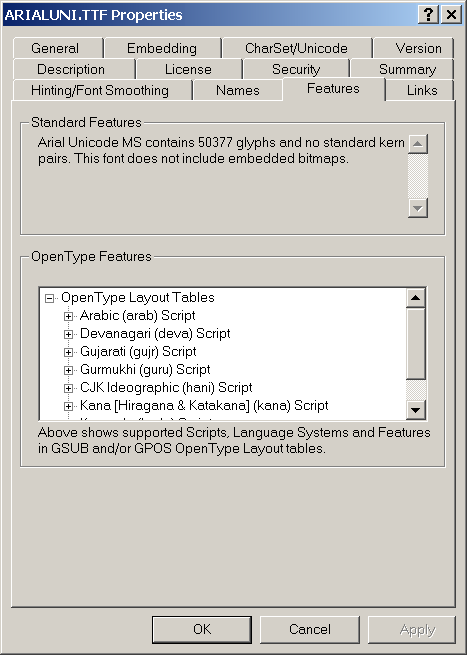
For Windows XP, an extension is available which provides a better overview of the properties of both OpenType and TrueType fonts.
Cross-platform issues
There shouldn’t be any! OpenType has been created to be truly platform independent. Fonts can be copied back and forth between Windows and Macintosh systems. To achieve this, OpenType fonts do not use the resource fork on Macintoshes.
Outputting OpenType fonts
When OpenType was launched, Adobe licensed its ATM rasterizer code to Apple and Microsoft at no charge. This means that the operating systems of these companies can offer system-level output support for these fonts. You do not need an expensive printer or RIP to be able to output OpenType fonts.
Until the release of PDF 1.6 (Acrobat 7), OpenType did not really exist within PDF files. Any application creating PostScript or PDF would convert OpenType fonts to Type 1 or TrueType font on the fly. That is why you never saw OpenType fonts show up in the preflighting reports of PitStop or other tools. Since PDF 1.6, it is possible to natively embed OpenType fonts in PDF files. I must admit that I haven’t seen any pop up. I am not aware of any issues outputting such files.
OpenType fonts containing TrueType outlines may not print properly on older PostScript level 1 output devices.
I just had w7 installed and all my type seems smaller now. Is there a way to change to larger type. Thanks
Go to the control panels and select the ‘Display’ control panel. It has an option to change the default text size. Mine is set to 120% because text is also too tiny on my Dell portable.
Just in time!
All right! Laurens, my problem was solved thanks to you. I didn’t think in Postscript + Distiller to reproduce the OT embedding. Thanks!
I can embed a Type 1 font (Myriad Pro Regular) following your instructions, but I can’t do that with an TrueType OT font like Lucida Console.
((Unfortunately) I’m working on Windows Vista now.)
Thanks a lot!
Alex
Hi Laurens,
How could we embed OT fonts in PDF?… I’m trying to use OT fonts in Indesign CS4 producing PDF 1.6 and 1.7 and the resulting embedded font in the PDF is always Type 1 or TT… I would like to achieve real OT embedding to test if a preflight detects it or not…
Might I use an special kind of OT faces or something similar?
Thanks in advanced!
Best regards,
Alex
As far as I know you cannot embed OpenType fonts as OpenType when exporting directly to PDF from InDesign.
Try this instead:
– Print your document to a PostScript file without embedding any fonts.
– In the Acrobat Distiller settings, make sure the option to embed OpenType is activated and that no subsetting takes place. Set the PDF level to 1.7.
– Distill your PostScript file.
You should now have a PDF with OpenType embedded as OpenType – at least that is what PitStop preflight reports.