RAID is a technology that is used to increase the performance and/or reliability of data storage. The abbreviation stands for either Redundant Array of Independent Drives or Redundant Array of Inexpensive Disks, which is older and less used. A RAID system consists of two or more drives working in parallel. These can be hard discs, but there is a trend to also use the technology for SSD (Solid State Drives). There are different RAID levels, each optimized for a specific situation. These are not standardized by an industry group or standardization committee. This explains why companies sometimes come up with their own unique numbers and implementations. This article covers the following RAID levels:
- RAID 0 – striping
- RAID 1 – mirroring
- RAID 5 – striping with parity
- RAID 6 – striping with double parity
- RAID 10 – combining mirroring and striping
The software to perform the RAID-functionality and control the drives can either be located on a separate controller card (a hardware RAID controller) or it can simply be a driver. Some versions of Windows, such as Windows Server 2012 as well as Mac OS X, include software RAID functionality. Hardware RAID controllers cost more than pure software, but they also offer better performance, especially with RAID 5 and 6.
RAID-systems can be used with a number of interfaces, including SATA, SCSI, IDE, or FC (fiber channel.) There are systems that use SATA disks internally, but that have a FireWire or SCSI-interface for the host system.
Sometimes disks in a storage system are defined as JBOD, which stands for Just a Bunch Of Disks. This means that those disks do not use a specific RAID level and acts as stand-alone disks. This is often done for drives that contain swap files or spooling data.
Below is an overview of the most popular RAID levels:
RAID level 0 – Striping
In a RAID 0 system data are split up into blocks that get written across all the drives in the array. By using multiple disks (at least 2) at the same time, this offers superior I/O performance. This performance can be enhanced further by using multiple controllers, ideally one controller per disk.
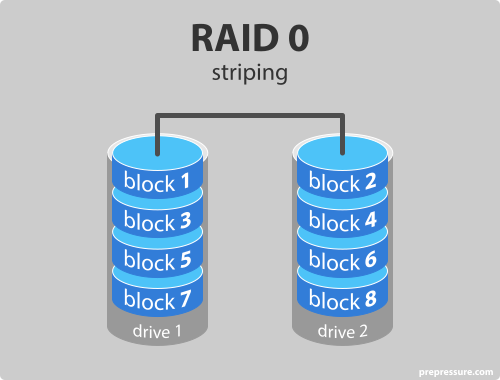
Advantages of RAID 0
- RAID 0 offers great performance, both in read and write operations. There is no overhead caused by parity controls.
- All storage capacity is used, there is no overhead.
- The technology is easy to implement.
Disadvantages of RAID 0
- RAID 0 is not fault-tolerant. If one drive fails, all data in the RAID 0 array are lost. It should not be used for mission-critical systems.
Ideal use
RAID 0 is ideal for non-critical storage of data that have to be read/written at a high speed, such as on an image retouching or video editing station.
If you want to use RAID 0 purely to combine the storage capacity of twee drives in a single volume, consider mounting one drive in the folder path of the other drive. This is supported in Linux, OS X as well as Windows and has the advantage that a single drive failure has no impact on the data of the second disk or SSD drive.
RAID level 1 – Mirroring
Data are stored twice by writing them to both the data drive (or set of data drives) and a mirror drive (or set of drives). If a drive fails, the controller uses either the data drive or the mirror drive for data recovery and continuous operation. You need at least 2 drives for a RAID 1 array.
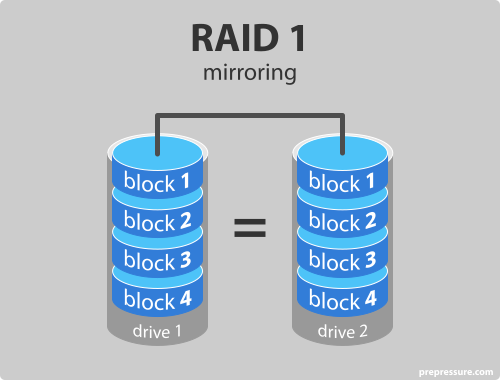
Advantages of RAID 1
- RAID 1 offers excellent read speed and a write-speed that is comparable to that of a single drive.
- In case a drive fails, data do not have to be rebuild, they just have to be copied to the replacement drive.
- RAID 1 is a very simple technology.
Disadvantages of RAID 1
- The main disadvantage is that the effective storage capacity is only half of the total drive capacity because all data get written twice.
- Software RAID 1 solutions do not always allow a hot swap of a failed drive. That means the failed drive can only be replaced after powering down the computer it is attached to. For servers that are used simultaneously by many people, this may not be acceptable. Such systems typically use hardware controllers that do support hot swapping.
Ideal use
RAID-1 is ideal for mission critical storage, for instance for accounting systems. It is also suitable for small servers in which only two data drives will be used.
RAID level 5 – Striping with parity
RAID 5 is the most common secure RAID level. It requires at least 3 drives but can work with up to 16. Data blocks are striped across the drives and on one drive a parity checksum of all the block data is written. The parity data are not written to a fixed drive, they are spread across all drives, as the drawing below shows. Using the parity data, the computer can recalculate the data of one of the other data blocks, should those data no longer be available. That means a RAID 5 array can withstand a single drive failure without losing data or access to data. Although RAID 5 can be achieved in software, a hardware controller is recommended. Often extra cache memory is used on these controllers to improve the write performance.
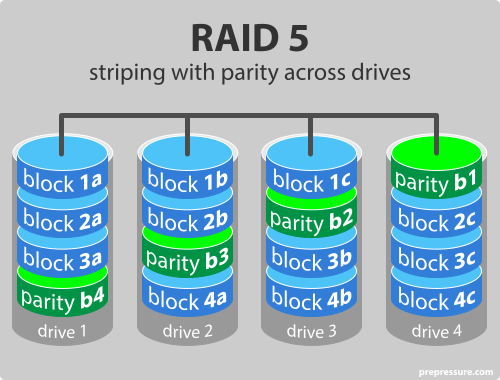
Advantages of RAID 5
- Read data transactions are very fast while write data transactions are somewhat slower (due to the parity that has to be calculated).
- If a drive fails, you still have access to all data, even while the failed drive is being replaced and the storage controller rebuilds the data on the new drive.
Disadvantages of RAID 5
- Drive failures have an effect on throughput, although this is still acceptable.
- This is complex technology. If one of the disks in an array using 4TB disks fails and is replaced, restoring the data (the rebuild time) may take a day or longer, depending on the load on the array and the speed of the controller. If another disk goes bad during that time, data are lost forever.
Ideal use
RAID 5 is a good all-round system that combines efficient storage with excellent security and decent performance. It is ideal for file and application servers that have a limited number of data drives.
RAID level 6 – Striping with double parity
RAID 6 is like RAID 5, but the parity data are written to two drives. That means it requires at least 4 drives and can withstand 2 drives dying simultaneously. The chances that two drives break down at exactly the same moment are of course very small. However, if a drive in a RAID 5 systems dies and is replaced by a new drive, it takes hours or even more than a day to rebuild the swapped drive. If another drive dies during that time, you still lose all of your data. With RAID 6, the RAID array will even survive that second failure.
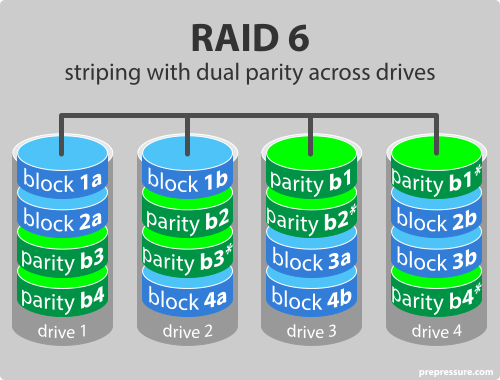
Advantages of RAID 6
- Like with RAID 5, read data transactions are very fast.
- If two drives fail, you still have access to all data, even while the failed drives are being replaced. So RAID 6 is more secure than RAID 5.
Disadvantages of RAID 6
- Write data transactions are slower than RAID 5 due to the additional parity data that have to be calculated. In one report I read the write performance was 20% lower.
- Drive failures have an effect on throughput, although this is still acceptable.
- This is complex technology. Rebuilding an array in which one drive failed can take a long time.
Ideal use
RAID 6 is a good all-round system that combines efficient storage with excellent security and decent performance. It is preferable over RAID 5 in file and application servers that use many large drives for data storage.
RAID level 10 – combining RAID 1 & RAID 0
It is possible to combine the advantages (and disadvantages) of RAID 0 and RAID 1 in one single system. This is a nested or hybrid RAID configuration. It provides security by mirroring all data on secondary drives while using striping across each set of drives to speed up data transfers.
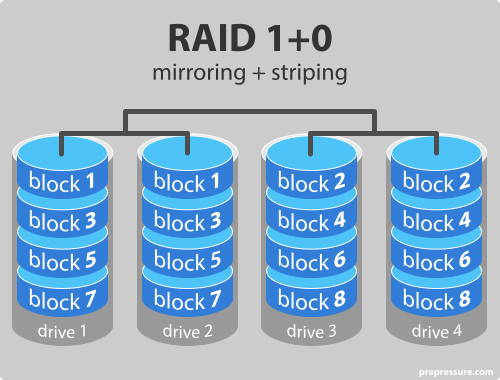
Advantages of RAID 10
- If something goes wrong with one of the disks in a RAID 10 configuration, the rebuild time is very fast since all that is needed is copying all the data from the surviving mirror to a new drive. This can take as little as 30 minutes for drives of 1 TB.
Disadvantages of RAID 10
- Half of the storage capacity goes to mirroring, so compared to large RAID 5 or RAID 6 arrays, this is an expensive way to have redundancy.
What about RAID levels 2, 3, 4 and 7?
These levels do exist but are not that common (RAID 3 is essentially like RAID 5 but with the parity data always written to the same drive). This is just a simple introduction to RAID-systems. You can find more in-depth information on the pages of Wikipedia or ACNC.
RAID is no substitute for back-ups!
All RAID levels except RAID 0 offer protection from a single drive failure. A RAID 6 system even survives 2 disks dying simultaneously. For complete security, you do still need to back-up the data stored on a RAID system.
- That back-up will come in handy if all drives fail simultaneously because of a power spike.
- It is a safeguard when the storage system gets stolen.
- Back-ups can be kept off-site at a different location. This can come in handy if a natural disaster or fire destroys your workplace.
- The most important reason to back-up multiple generations of data is user error. If someone accidentally deletes some important data and this goes unnoticed for several hours, days, or weeks, a good set of back-ups ensure you can still retrieve those files.
To learn more, read the page on the best back-up policy.
Most articles I see refer to anecdotal observations that striping drives in Raid 0 is not that reliable because if any drives fail the whole array fails. I would like to know if there are actual long term studies to date concerning reliability SSDs in RAID 0 striping format as i haven’t seen any besides a google out of date mechnical HDD long term study.
By my understanding shouldn’t Raid 0 striping actually distribute drive wear and hence make your drives overall last longer, especially with more drives?
I mean take for example a normal setup where you just have a normal multiple drive setup with 1 primary drive as a c: drive, most likely your other drives for the majority would be used like static storage drives while your single system c drive would always get the bulk of read write processes.\
Wouldn’t this traditional setup wear out reliablity of a drive much quicker than a raid 0 setup?
It’s not about how long HDD or SSD could survive in RAID 0, it’s about what will happen when failure occurs. There’s no warranty against issue on manufacturer side, bad cable/plug, etc., means there is always a chance that disc will malfunction before it’s expected EOL.
With RAID 0 it would mean loss of whole array, renders stored data as non accessible, while any other RAID still could provide access.
It might last longer because the wear is spread out over multiple drives but in the end when one of those drives does fail eventually it’s the same as if all the drives died … actually it’s even worse because with a with a simple single drive that failed you can often take the drive to a specialist to recover information from the drive if the information is worth the cost and you don’t have backups elsewhere but I imagine that isn’t quite so easy with a Raid 0 failed drive on the other hand with the other raid levels if a drive dies you just take it out and put in a new one and let it rebuild the dead drive and as long as another drive doesn’t die during the rebuild then you’re good to keep going … and if you’re using raid 6 then even if a second drive does die you’re still good as long as a 3rd drive doesn’t die before the first is rebuilt
Any kind of RAID except RAID 0 will have different levels of performance inpact because of the “Stripes” accross the disks. What RAID gives you is the abillity to keep going if one or more disks fail depending on the RAID option. As disk have become much larger in size and therefor the rebuild time will take longer most SAN vendors use “Triple Parity RAID” (RAID 7.3)
Looking at how a home storage system would work, if I have a 2 x 2TB RAID 1 config, I can store upto 2TB. If I putchase a 4TB drive, and I sub out one of the 2TB drives and add the 4TB, I still have 2TB storage. Am I able to add the spare 2TB drive to the remaining 2TB, and have a 2x2TB that mirrors the 4TB? Is this RAID 1+0. This is in a FreeNAS system I built a few years ago, but is now getting full. I only have three SATA connectors on the motherboard free for expansion of the storage drives. Any thoughts?
You maybe able to create two 2 TB partitions from the 4 TB drive then mirror the smaller drives
I do not understand why.
This will only protect against a File System failure.
If the drive has a hardware failure you are What you would be if you were attached to another object by an incline plane wrapped helically around an axis.
Regarding RAID 10, you write that “Half of the storage capacity goes to mirroring, so compared to large RAID 5 or RAID 6 arrays, this is an expensive way to have redundancy.” This is not true if you have RAID 6 in a four disk array. Redundancy in RAID 6 is N plus 2, which is 50% for a 4 disk array, identical to, not less than what you get in RAID 10.
What about a RAID 6 array with 12 disks vs RAID 10 with 12 disks? or 24 or …
Hi,Out of all RAID types, Which RAID type has maximum storage efficiency? and why?
Raid 5 as a short answer.
Gives you 75% of your total disks, compared to 50% with everything else.
Raid0 has “maximum storage efficiency” as 100% of total disk space is available for use. However Raid0 lacks any redundency, thus its purpose is solely to combine capacity of multiple physical drives into 1 logical disk.
Raid5 is 75% total capacity, Raid1 6 and 10 are 50%. But these all have fault tolerance, which is the primary reason for running Raid.
If your only question is storage efficiency then obviously Raid 0 it has 100% efficiency but it has none of the protection other Raid levels offer that said for over 2 drives with some protection Raid 5 has the next best efficiency at (x-1)/x efficiency where x is the number of drives in the Raid 5 array and Raid 6 has better protection but slightly less efficiency as the number of drives go up with (x-2)/x efficiency
I use CrystalDisk on my office PC to check the health on all my hard drives so I have some warning when it’s time to replace a drive. I’m running a RAID mirror with two identical drives that were installed at the same time. The array shows healthy, but CrystalDisk says one drive is 86% healthy while the other only says 67%. The total reads, writes, and hours used is also noticeably different between the two drives. Isn’t RAID mirror supposed to create IDENTICAL drives? Shouldn’t the reads/writes/hours be identical between the two? The difference in specs between the drives makes me wonder if I’m actually getting a true mirror result.
I don’t know about the reads/writes/hours, but as to the difference in % healthy: in any manufacturing process there is a range of variation of the lifespan of the product manufactured. For example, your car headlights. In theory, the original car headlights ought to fail together, right? After all, they are the same product, likely made from the same manufacturing batch, and each one was used the exactly same amount of time as the other, right? Yet experience shows us that two headlights almost never fail at the same time. I am not surprised at the different percentages, but I AM surprised at the degree of difference between the two drives. I would have expected that the spread between the two percentage to be less than 10%.
RAID is frequently used to improve the performance characteristics of individual discs (by striping data across multiple discs) as well as to protect against individual disc failures. RAID is no longer a required component for Exchange 2016 storage design, thanks to advancements in high availability. RAID, on the other hand, remains an important component of Exchange 2016 storage design for standalone servers and solutions that require storage fault tolerance. For Exchange recovery and migration visit: https://www.edbmails.com/pages/exchange-2013-migration-to-2019.html
I sprayed a can of RAID into my NAS, how do I fix?
I might have to try that…the roaches are pretty bad here. Vermin in your hard drives can be detrimental.
I had that kind of problem and I put some Laurel leafs as repelant inside a PC and with success. instead RAID can’s.
https://www.dicasonline.com/plantas-afastam-baratas/
Just a note.
we have three 1 tb hdd in a group if one 1tb hdd is failed , we can insert 2tb hdd replace for 1tb hdd int he same group?
Lmao….data storage and redundancy at the global scale is like creating a very granular universe representating user data for a specific reason. While intriguing technically, it creates a paradox of storing user data…a solution maybe real time data flow that doesn’t rely on past data other than used in the financial industry…. realtime data flow would closely mimic reality, especially the social media reality…I suggest having very localized data storage through-put, especially at the users device for their personal data…. however the conundrum seems perplexing at best of a centralized control of data n information….good luck though, the industry does seem secure enough for the future even if relegated to a minimal platform of user basic information.. . whatcha think anyone???
Yes, mostly. It depends on the RAID controller in use; but Linux kernel-level RAID allows the use of partitions as members in a dataset. This allow you to actually add 2 members on one drive; or just forget the second half of the 2TB drive until you have more of them installed. Either way, you can add disks that don’t match your current set up, but they might not be fully used. The smallest member is used for all, so adding a smaller member won’t work, but a really creative admin might add two small disks to a virtual volume, then add that to a RAID set and get it to work. I’ve done some stuff with mismatched drives, but I haven’t gone THAT crazy. Certainly, RAID-0’ing several RAID sets into one drive is done all the time to increase speed by taking advantage of fast hardware or just for convenience.
Was not happy when the cookie options were ACCEPT or ACTIVATE PARANOID MODE. absolutely disgraceful!!!!
lmao
Yeah, your mom said same thing to me!
she said you were “absolutely disgraceful”?
Hey it’s just a joke, lighten up!
I need to setup a NAS box for a company doing surveying with drones that will be producing about
a 200 GB file, per week, for about 9 months. So about 7TB of data in that time frame. They would like fast right speed to the NAS and will be pulling the files to edit on workstations. There will be 5 people connected to the server at a time, with 1 person at a time accessing a file.
How many of what size drives would you recommend and what RAID is best for this app?
Thanks in advance for your opinion.
Sounds like you’re right fucked mate. Sorry!
I would say do 5 2tb SSDs if budget allow with a raid 5 config on it, that will give you good read speed for better right speed you want to use a hardware controller and will give you 3 extra tb of space to ensure you don’t run out that would be the proper way to do it.
Hi,
Can you please explain the difference between Raid 16 and raid 61? What are the Possible applications of these combinations? Advantages and disadvantages.
Please help..
Thanks in advance.
I had never looked into these combinations and found this interesting thread about them: https://serverfault.com/questions/674462/why-is-raid-16-not-a-more-common-layout
TLDR: RAID 16 or 61 setups are complex and cost a lot while offering little extra benefit. Hardware RAID controllers typically don’t support these combinations. Given that an off-site copy of the data on a RAID 6 array is more useful and secure than a local duplicate, it makes more sense to invest in that.
Hi, I’m considering setting up a NAS to my half business, half hobby activities on filming nature. I’ve got about 2 TB of film material, and it will increase step by step over the next years.
My questions:
1. Is NAS the good solution?
2. Which RAID, and how many drives would be necessary if I go for NAS?
3. Is NAS really a safe backup solution? Would I need an external hard drive to make backups in addition?
Thank you
1. A NAS is a good solution for storing your video files and streaming them to your TV, tablet,… It is not ideal for storing files you are editing. I’d use the local storage in your computer for that.
2. Given your current requirement a mirroring setup with 2 big disks, such as 2 6 Tb drives, makes the most sense to me.
3. The NAS can get stolen, damaged in a fire or flood, have 2 disks fail at around the same time, etc. You do need an off-site backup.
For the questions you’re asking you’re failing to supply the right data to work out a proper answer
A proper answer comes down to a balance of multiple factors such as: What am I worried about? a failed drive? someone breaking into your home/facility and making off with your equipment? a city wide fire? accidently deleting a file you should have kept? … that’s the first factor the second factor is How much am I willing/able to spend to mitigate these worries? if you’re willing to spend enough you can have cloud based backups on services like google’s drive and a number of other online back up servers plus large Raid arrays locally for faster recovery from smaller problems but again you have to balance ‘How worried am I?’ against ‘How much am I willing/able to spend?’ and that’s not even getting into the factors of performance requirements yet the answer is very different if this ‘half business’ is only intended to make enough money to buy you a few extra beers each week vs if it’s to be your sole income to survive off of … in the end any ‘simple’ answer anyone gives you based on what you provided here will be based on their assumptions in filling in the blanks in the information you didn’t provide
Hi, I’m looking at converting to NAS for my storage. I currently am using a 10TB single external hard drive, so I’m totally upgrading and anything is better than what I’m utilizing. I’m considering getting a 4 or 5 bay hot swappable NAS and purchasing 4x Exos 16TB drives (or IronWolf Pro, or something of that nature) to run in RAID 10. I’m currently storing 8TB of work stuff, videos, pictures, music, etc and want the redundancy, but also want the better speed/performance (hence RAID 10). Essentially 32TB is more than enough storage for me for many years. I’m looking for a recommendation for the NAS device. I want something that will work with future computers/routers, so probably USB 3.1, and assuming the max of 8GB RAM. Is there really any point in getting ones that have NVME storage slots as well? Any suggestions or advice on a model to consider?
Thank you in advance
My situation is as follows: Home based technical specialist consultant. Work PC has an SSD (1.2TB Intel 750 series PCIE 3.0) for C: drive and a SATA disk as my data drive, which is backed up to a 4-bay NAS (Raid 5 IIRC), typically weekly in the past :(. Recently the original SATA disk (6TB WD Red, a bit less than 5 yrs old) failed with some loss of data. To my alarm, the replacement drive (10TB Exos) I added lasted just 9 days (hardware failure confirmed & now replaced by Exos supplier). I was intending to replace my existing PSU (RM650) “just in case” but supplier was adamant that wasn’t necessary – just bad luck that the replacement failed. ??
For an *added* layer of protection, I am thinking of getting two new disks (10TB Exos, or possibly Surveillance AI ?) and setting them up in Raid 1 for D: drive. This is on the assumption it would provide a continuous duplicate copy of my data. The data would still be backed up to NAS of course. So in the event of one disk failing, there should be near zero loss of data (??).
My concern is that when I read up about Raid options, Raid 1 often seems to be not that favourably viewed.
To be clear:
1. Shutting down the PC to replace the failed drive not a problem (its a single user PC)
2. The cost of providing a second drive for no increase in storage is not an issue. 10TB is well in excess of current needs, and the cost is minor relative to the potential cost of failure if have only a single disk for D:. Even if no loss of data, recovery from NAS takes time, as does buying & setting up a new drive, etc. And even if only a few hours loss of data, reconstructing that can be time consuming.
Does the proposed arrangement make sense in my situation?
Or should I be looking at other alternatives?
Thanks for any advice you can provide
depending on how much you value the time, this could work, though there are more efficient ways to implement such things. i don’t know what programs you are working with, but do a search for “real time over the network data mirroring”… there are now a lot of good packages available out there, some with really highend ptp tunneling connections so you can use your existing corporate storage in real time
Hi there,
If this is still actual, I can recommend the Indian program “MirrorFolder”, which offers many kinds of backup options, such as RAID1-style, timed backups, local or network, etc.
It’s a VERY inexpensive program and I’ve used it for several years and even translated it into Danish for them since I liked it so much. c”,)
I am setting up a home server/backup/storage of my home files, photos, movies, etc.. have a 8 bay dell Poweredge. I will be using 8x8tb sas hdd. Basically just looking for redundancy and not to worry about losing my files, pictures, movies. What RAID would be best? Thanks.
RAID 6 seems to be the prefered solution for setups with so many disks.
My old desktop is dead. I am pretty sure the two drives were RAID 0 I pulled the HDD’s to be able to retrieve and move the data and pictures but when I try to read them with the IDE/SATA US3.0 adapter, they come up as unrecognized file system. Will I need to find a way to hook them up together to be able to get the data back?
You cannot read the data of one individual drive that once belonged to a set of RAID disks. In your new machine, the two disks must be configured identically to how they were configured in the old setup in order to access the data.
There are certain disaster recovery programs that are able to recognize RAID drives.
I agree with Laurens about the need to set up the array as it was configures on the old computer, but some programs might still be able to assemble the array and restore the data, even if that’s not the case.
If you’re concerned about any potential data loss, I’d recommend cloning the drives before any attempts are being done – ddrescue (Linux) or Ghost, for example, are good candidates for this task.
Unix or Linux? what back up software was being used on the original desktop or server?
I am about to build a server with RAID using Lenovo ThinkServer TS440. It has a 4×3.5″ HD cage with a backplane. I also has a hardware RAID card LSI 9260-8i with BBU. I have four 4TB HDD (used) and two 2.5″ 240GB SSD (used) on hand. The HD cage can take 4 3.5″ drives. I want to install Windows Server 2019 on it. What is the best way to go about? The obvious option for me is to separate OS from data. Install OS on these two 2.5″ SSD on RAID 1 using Fake-RAID from BIOS and store data on four 3.5″ HDD on RAID 5 using hardware RAID card. Please bear in mind that these drives are used and pulled from servers. Any better way for this? Thanks.
From the presented list of RAID , which RAID is best for enterprise NAS devices. and which RAID level is having both mirroring and striping feature?
Please can you give information regarding this as soon as possible.
which RAID level is having both mirroring and striping feature? RAID 10
I want to add 24 bay 4U rackmount for my PC or server with 24 x 4TB of disks. Which RAID should I get & how much storage can I use from that?
Every disk is a potential point of failure, so using 24 small disks (which 4TB drives meanwhile are) is not necessarily the most secure starting point. Consider using fewer but larger drives. This will also be slightly cheaper as an 8TB drive costs less than 2 4TB drives. With 12 8TB drives in a RAID 6 config, you still have 80TB storage available. The empty slots in the enclosure can be handy for future expansion. If you can leave an empty slot between adjacent drives, that will also allow them to run a bit cooler.
I agree with Laurens.
Even with RAID 6, the risk of failure with that many disks is quite high. You COULD of course build a RAID 61, so that you have two identical RAID 6 arrays. However, that would give only 40 TB of disk space,
Perhaps Laurens’ suggestion is better. I’ve just created my first Nexsan SATABeast array, in which I chose a RAID 6 configuration with a hot spare, since I’m using as many as 11 drives not counting the spare… and the risk of disk failure with that many drives sends shivers down my spine. c”.)
Luckily, it’s “only” meant as a backup for my RAID5 arrays, although I’m seriously considering using it for boot and main storage in the future.
I’m building a PC for my son who does animation for clients. He may work on a project for a few weeks and then will deliver the product. What type of raid system might be best for an application like that ?
raid 5
RAID 0 with a back up of the file. RAID0 is fast for rendering but you will loose everything if a disk fails, but that’s what backup is for
If i put 4x6TB drives in a 4 bay NAs and use Raid 5. How much capacity will i actually have afetr configuration
18 TB
For RAID 5 you lose one hard drive of storage to parity, so you would get (n-1)*sze storage, or (4-1)*6TB=3*6TB=18TB of storage.
Which raid level would be best for backing up a small online delivery website ?
I assume the amount of data is fairly limited so I’d go for the easiest and most affordable solution – a RAID 1 mirroring setup.
Can i use two 1 TB SSDs each, in Raid 0 and then mirror the data onto a third SSD of size 2 TB using Raid 1, i.e. essentially Raid 0+1 using three disks. If not suggest me a solution for this, because i only have three M2 slots in my notebook and would want both the benefits of Speed And Security of the Raid Levels
You should use 1TB in each of the three slots, and use Raid5 to both benefit from speed and security. Data and parity will be spread across 3 drives, so that reading and writing is done to 3 drives, and 1 is allowed to fail. If it does, it needs to be replaced. About 30% of storage will be used for parity, leaving you 2 out of 3TB for your own data.
I have a drive that failed in a RAID 1 configuration.
I need more space so I was going to get 2 new bigger HD.
Now is it advisable to use 2 identical drives or could I use a high performance desktop (7200RPM) as the main drive and get a cheaper NAS drive for the mirror? Both would be the same size. Any issues with doing that?
In RAID 1, write speed is as low as the slowest drive. For reading speed it’s a bit faster than the fastest drive.
I don’t recommend using different drive for RAID 1. Only if you want a better reliability in the way that different drives have less tendency to fail at the same time.
Hello,
I enjoyed you info.
I could use your expert advice on a Hard Drive situation I have.
Back in 2010 I had a 1TB External Seagate hard drive. With alot of data and Pro tools tracks.
The drive stopped working one day. I removed the 2-500 gig Hard drives and tossed the housing.
I stored them away for safe keeping hoping to recover the data one day.
Recently a friend said that they won’t work separately as they were part of a 1 TB scenario and the data is split between them.
He tested them and they still work but no data.
How do I marry them again to work as one external drive?
I am running Windows 7. Can I use SATA jumpers to daisy chain them?
Any info would be a great help.
This would be a lot more simple with a Linux system, because it has much better facilities for accessing drives other than as filesystems. Ask around your circle for someone who has Linux knowledge.
Whatever you do, do not put the drives into a hardware RAID device and install them as a striped pair. The RAID controller is likely to overwrite some of the data on the disks, as soon as you do this.
have a look at Reclaime, that should be able to do it. I’ve used it to recover data after a 12TB 4 disk readynas lost a disk and then failed to resync.
https://www.reclaime.com/library/how-to-recover-raid.aspx
I have 5 hdds. I have 2 select RAID6 and RAID10. Which one is the best one for me?
Regards,
Kelvin
RAID6.
RAID means Redundant Array of Independant Disks, not Inexpensive. It’s funny because a classmate read that exact paragraph off this website yesterday, as an answer for our lecturer’s question, and got the information wrong. I was amused when this popped up on Google.
Both ‘inexpensive’ and ‘independent’ are used and up to now I stuck to the most popular abbreviation. You do have a point that for completeness both versions should be included, so I updated the page. Thanks for the feedback!
Expensive??? LOL. You can put together a 4 TB RAID 1 (2 TB usable) backup in your PC for less than $150. (That’s using enterprise/NAS/surveillance HDDs. HDDs that have a long MTBF and are more robust than a standard HDD.) Using off-the-shelf HDDs, you can do an 8 TB/4 TB usable backup for the same price. If you buy a lot of used enterprise/NAS/surveillance HDDs, you could build a really impressive 12 TB total/8 TB usable, RAID 5 config, in-system backup, for a couple hundred bucks. It’s definitely not expensive, by any stretch of the imagination. If $100-200 is expensive to you, your data is not important enough to warrant any RAID backup other than a RAID 0.
I believe the term “inexpensive” was the original term used. You have to keep in mind that RAID has been around a long time and was originally only used in RAID 0 fashion. This was useful since at the time hard drives were VERY expensive, especially as size increased. It was cheaper to create a large RAID array (inexpensive) of disks than it was to purchase a single drive with the same capacity.
Very nice brief on RAID
I would like to find some documents on what each RAID configuration would need as a minimum from the server it is running on. I was forced to run RAID 5 on a job I came into, it was running on a DNS 1200-05 NAS device, which my predecessor bought before I took over IT at a small Transportation Planning Gov’t Org. It worked for documents, but not for large (or small) amounts of data needed to be drawn. Its hardware was very subpar, and although it makes a big deal of being a quad-core, its limit was 800mhz, which is not as fast as current high level cell phones. The tech who set it up could not see how a RAID 5 could slow it down, I just wanted to eliminate redundancy altogether except for my manual but effective backups at night and lunch. In my effort to procure money from my manager I rebuilt our old server with new cooling and clean install, as well as RAM improvement to 3.5gb of RAM, it was a 32 bit single core, but ran 3.8ghz. The D-link would render my mock up map in 300 seconds, the old server took 7 seconds. This D-Link should only be used for homes or documents. Large datasets are useless, write speeds are terrible, as are read. It was a nightmare. And the fact that the old 32 bit with an unreal amount of use was made to look like a giant rack system comparatively was not enough to get any money for a new server. I had no technical documents simple enough to say you need X to run RAID this or that. So before I left I was bitter and disassembled the server, completely repairable, just assemble and install OS, I also left them larger HD’s. A City Planner has not enough skill to set up a monitor, jerk move on my part, but deserved. Amazed to find City Planners have no mathematical skills, coming from Engineering I assumed they were similar. Point is, Planners are useless managers and have no skills. And I could go on! Apologies.
bro the parity notation can be quite confusing. instead of using “b” you could use “p” from parity. for a begineer is easy to confuse the b with a block of data. if you have a look on the diagram you use b to represent sequential block sectors that are written to the disks. you don’t want to confuse the data with the parity xor.
If I’m wrong sorry for wasting you time
Peace
can you elaborate more about the configuration of raids? or any other way to learn?
Raid systems are to protect data and that is given! How one likes to protect data is decided on the conditions and requirements. To make it short; to be secure at home, get a cloud storage which is slow but very safe as the large service providers take this very seriously but it is a bit expensive or buy a back up drive from Western Digital, Seagate etc. In my case, I want my data access to be fast, failsafe and accessible from anywhere in the world! What do I do?! I get a raid system like Raid 5 or 6 with 6 drive bays, a back up system to automatically back it up and get a service provider to have them connected to internet like it is in the cloud but actually it is a private cloud. One can also have a cloud storage lage enoufh to replicate the data at home which is stripped with parity and backed up. It sounds like overkill? Think about shooting film at a location that costs $3000.00 or $300,000.00 per hour?! Now would you spend $10,000.00 on the array system and $2000.00 per year for the cloud storage? Answer should be “Yes”
What is parity? It is the end result of calculation of data written on a disk as in 1s and zeros. The result is also in 1s and zeros. You write the result in the parity section which is also distributed so that it also has parity information. Confused? It took us haf a day in class some 20 years ago to understand and learn but you do not have to go through that. Imagine there are 5 disks. Data you lost on a drive is missing but like a puzzle, you have all the surrounding lines that are continuing at the other side of the missing piece. You also have the colours. You can cut a new piece out of a cardboard and draw the line to connect at the other side and paint to match the other 4 piece’s colours! More, less, this is the idea.
You can download this Intel Raid controller simulator if you want to practice setting up RAID.
Link: http://downloadmirror.intel.com/25732/eng/RAIDInteractiveSimulator4.exe
This is a nice write up, but missing some basic logic. The only disadvantage of RAID 10 is cost as you get about 45% of total raw space for usable space. Other than that, it has the best performance and redundancy of all RAID levels.
RAID 5 and even worse is RAID 6 have huge write penalties, they have huge I/O write delays. They are good if you’re looking for redundancy but not performance.
I currently have 11TB of [ictues on a 12 TB drive. If I create 3 new 12TB drives will that give me 36 TB in Raid 5?
Is there another Raid configuration that is better for capacity and redundancy, plus speed?
Hi
I have an array of 12x12TB drives. I created a RAID 6 across all 12 and then created one partition and am using an xfs file system. I am getting about 1.2GB/s write speeds, which is great. Beforehand I put this into production I am trying to figure out if there is an advantage in recreating this as 2x RAID 5 of 6 disks each and then creating a filesystem on one logical volume using these two RAID 5’s.
Any comments/suggestions would be appreciated! Thank you
Need some. configuration steps for raid level 5?
It all depends on what raid you are planning to use.
what is RAID 0+1 ?
RAID 0+1 and RAID 1+0 are both fault tolerant.
RAID 1+0 is two mirrored sets that are striped. Also has the fastest throughput of all RAIDs.
RAID 0+1 is two striped sets that are mirrored.
RAID 0 – striping
RAID 1 – mirroring
RAID 1: Not sure.
RAID 5: 6-1=5TB
RAID-DP: 6-2=4TB
RAID 0+1: Not sure.
RAID 1+0: Not sure.
SIR I HAVE ONE QUSTION WE ARE USING DELL POWER EDGE 2900 SERVER WITH RAID-5 CONFIGUTTION.CAN I REPLACE DELL SAS HARD DISK WITH ssd.If yes that what is procedure.please guide use.
Remove Bad SDD and insert new SDD, Data will rebuild automatically. If RAID 5 is configured it will take time for rebuild data.
what is raid 50?
Simply like RAID10..
Raid50 is a strip of groups of RAID5. They say better write performance and increase data protection.. every group of RAID5 requires minimum of 3 Disks. So if you have 9 HDs, create 3 cells of RAID5, meaning you can have 3 simultaneous fail providing no more 1 fail in each group.
Hi,
I have 5*6TB (5.5 actually), 5*4TB, 2*1TB, and 1*2TB with three servers of 6 hard drive slots.
My data can be split two parts: raw data (like compressed video and document files) and in-process data (like the data extracted from the compressed ones and need to be processed further).
for the first ones the data security is very high and for the latter the performance
what raid setup would you suggest?
thanks in advance for any suggestions
Hi, I am setting up a large array for a surveillance system.
I have spoken to some people about the size of hard drives available. Is it better to use say: 12 x 12TB Drives in Raid6 array or 24 x 6TB drives?
Given that the MTBF is the same for the drives, the lower number of drives has a lower potential for a failure. The more drives you have, the more likely a failure.
how does raid 3 works
What are the advantages of level RAID 1 over other levels
Speed.
Moshee,
With due respect to any and all responses who are all attempting to offer a free hand.
RAID 0 – STRIPING -Offers speed benefits due to striping across multiple disks. This ends up without a parody Drive involved which means a failure of one of any of the discs would result in the loss of all data in the raid array.
RAID 1 – MIRRORING – offers increased data availability depending upon your needs, RAID 1 will offer simple mirroring between an even number of disks within an array. This means if you have only 2 discs the data written to one will be copied to another or the data written to the three discs (1, 3, & 5) on the primary discs and then copied, or mirrored, to the other volume (2, 4, & 6).
Ultimately, if you have a single disk failure, one simply replaces the failed disc and rebuilds the volume with the array automatically copying the “missing” information from the replaced disc to the new disc.
Hope this helps,
Matt
RAID 1 offers complete redundancy. With 2 drives, it will mirror all data to the other drive, with 3 drives, it will mirror to both the other drives. Ex. You have two 1TB drives in a RAID 1, you will have 1TB of usable space and 1TB of redundant storage. Now if you have three 1TB drives in a RAID 1, you will have 1TB of usable storage and 2TB of doubly backed up storage. It will continue like that for as many drives as you put in. Your space will be limited to your smallest drive in the RAID 1, no matter how many drives you have. Chances of losing data in a RAID 1 get increasingly lower the more drives you have, but it also makes it very expensive per GB. Hope that helps.
Hi, I’m currently using a Raid 0 setup using 2 disks totalling 1TB on software raid 0. I would like to know if it is possible somehow to install Windows 10 on Raid 0? If so, how would I proceed?
You would need to have your RAID disk driver in hand before you begin installing Windows 10 on the PC. When prompted, you would then insert the disk with the driver on it. Most RAID manufacturers have an option to create the driver disk.
I don’t believe it’s possible to INSTALL Windows on a SOFTWARE Raid, since the Raid isn’t usually created until after windows is installed..
However, if you have a HDD Raid controller card, or a raid controller built into your bios, then you can create the raid there. Then using the Drivers for the controller, you can install Windows.. During install choose the option that says “Install 3rd party Scsi or Raid Controllers” then with the driver media inserted, or copied to the Windows install USB or whatever, navigate to that directory, select the driver, and your’re off to the… Well… (Windows will install)
I’m the idiot who backed up 4TB with a RAID 0 array…(had no clue my external HDD was even set up that way).
Anyway, I think the dual drives in the enclosure are fine but power suddenly just cut off. It won’t power on at all…
My question is this: Can I take out the platters and put them in a dual dock 3.5″ with RAID 0 support and expect them to mount so I can move all my data (presuming it’s ok) to a new drive? Or is there a way to repair the power issue in the enclosure?
Drive is G-RAID 4TB (4th gen) RAID 0
I had a similar problem with a four-bay Areca enclosure configured for RAID 5. The power supply on it failed, so the enclosure wouldn’t power up. I couldn’t wait the three weeks for the enclosure repair to regain access to the data, so I got an Areca eight-bay enclosure and loaded the four drives in. It fired right up perfectly.
Daniel Smith 4 drives of 3 Tb in raid 10 is 6 TB because the you combine 2 drives as raid 0 and the other 2 are used a mirror
Those who work with large amounts of data should choose between raid 10 or 6
In my view today raid 5 is no longer a good solution because of bitrot .. sadly raid 6 will not last much longer it will loose in around 2019-2020 its value because of the everlasting growth in the sizes we use. However the most secure is in my view raid 6 till the grow beyond the max of raid 6 is reached and it looses its ability to proper restore the files.
Daniel gave the correct answer to the asked question: “I am trying to configure 4 drives of 3 TB each. If I use RAID 1, what is my effective capacity?” as a reply to Laurens incorrect answer. Laurens answer was, just like yours, about RAID 1+0, but the question was about RAID 1.
4 drives of 3 TB in RAID 1 is 3 TB (one drive with data and three drives that are copies of the data).
4 drives of 3 TB in RAID 1+0 is 6 TB.
Daniel, I don’t know where you’re getting this bogus figure.
RAID 1 is simple mirroring, so your total capacity is HALF the capacity of all drives, not 1/4th.
RAID 1+0 is the same capacity; the difference is that data are striped across drives in addition to being mirrored..
Raid10 Am I right to be scared of mirroring ?- because I had a simple (simple domain controller server2003) 2 drive Raid1 fail (lost its mirror) but no one knew since they continued to write to the drive(s)- when I found out I could not tell which drive the data was on – it got mixed up across both drives and YES it too a LONG time to sort out
– file file by file! Is Raid10 failure along similar lines possible ?
You’ve worked with unsane RAID. Even a software raid should be telling you which drive is malfunctioning – at least Linux will flood error log with messages of failed drive.
A properly designed RAID, soft or hard, should be able to indicate the malfunctioning HD – otherwise it’s lacking bad!
If you have 4 separate raid 5 arrays, would a hard drive failure in one of the arrays affect only the performance of the one array and the others would remain unaffected?
I have no practical knowledge about this but assume it does have a certain impact as rebuilding the faulty RAID-set is pretty IO and CPU-intensive.
Depends on connectivity.
“If 100 people all go to work at the same time, will it cause a traffic jam?”
As long as no link is over 75% utilized, then only the degraded array will suffer.
“If you want to use RAID 0 purely to combine the storage capacity of twee drives in a single volume, consider mounting one drive in the folder path of the other drive. This is supported in Linux, OS X as well as Windows and has the advantage that a single drive failure has no impact on the data of the second disk or SSD drive.”
Can anyone explain this?… How can we mount, and how this makes advantage against drive failure?
You’ve got a misunderstanding of how raid 0 works. You have a file that is broken into 10 chunks, and those chunks must load into memory before you can use them. So on one dish, your hard drive controller loads block 1, then block 2, then block 3… etc. In raid 0, it would load block 1 and 2 at the same time, then block 3 and 4. This is oversimplified, but that’s why you get faster performance in raid 0. But if you lose a disk, you only have half your file. It’s lost unless you have a backup. What you are recommending will not increase speeds by much, unless you are loading to files in separate folders. This doesn’t increase the speed that you access those individual files, just that you can load those separatefiles at the same time. Raid 0 allows you to load a single file in about half the time (processing overhead reduces it down from a flat “double the speed”, but it’s still much better than one drive.
Thanks for beautifully explaining the types of RAID. I am a tech guy and was using RAID 5. Somehow, I had lost the data from it. So, I asked the solution from my colleague and he advised me to use Stellar Phoenix raid recovery software. I had purchased this software from http://www.stellarinfo.com/windows-raid-recovery.php. This works great for me. Thanks!
Stellar Phoenix is a scam company and this fake comment is just sock puppet marketing. Buyer Beware.
Great post! When backing up data I always use the 3-2-1 style strategy. 3 total copies, 2 local and 1 in the cloud. That’s a great place to start! But, more is always better.
Thanks Laurens. Sorry I would like to ask a bit more
You opt for Dual mirror: so in that case, no need another drive for TM ? If TM, then the drive is also need 3TB ?
2. For NAS, as when I check if using NAS in Thunderbolt, so pricey and need around 4 to 6 bay HD, all these HD are 3.5”, so come out the NAS is very big and heavy
Laurens, my main purpose is like bigger HD with speed (like what I am currently using 1TB SSD), actually I have a ext 1TB SSD in Samsung, but I still prefer to have some external HD (or even SSD) to extend my storage, so in that case, any product you can recommend, in Apple web, I see the offer ext drive like Promise Pegasus2, G-tech.
Thanks for your quick reply and have a nice day !
I’m no Time Machine user myself but according to a few web sites I checked it is not absolutely necessary to use a separate partition for a Time Machine backup. You can put other data on that partition but it apparently more common to use a separate partition. http://www.howtogeek.com/212445/how-to-use-a-time-machine-drive-for-both-file-storage-and-backups/
The mirrored drives protect your data against 1 disk failing. Accidental errors like incorrectly deleting a file or misplacing it or data corruption are more common and a bigger worry. That is why you use Time Machine for the data residing on the internal drive but of course the same also applies to the data that will be stored on those mirrored drives. So in my opinion, the ideal setup is that the third drive on which you put your Time Machine data is also a 3GB drive, split into one partition for Time Machine and a second (bigger) partition on which you occasionally copy the main data stored on your mirrored drives. I know that adds to the cost but I like having a spare copy of data and I like having systems with disks that are all the same size. Easier to resell afterwards, easier to repurpose as a 3-disk RAID set if your storage needs change over time.
As for the best type of disk enclosure for Mac: I have no idea since I stopped using Macs a year ago and don’t read up on them anymore.
I have iMac in 1 TB SSD, but almost use 60%, now thinking several ext HD to store those datas, If I let say use 4 x 1 TD and in Raid 5, do I still need to do some disk partition to change 4 HD into 1 ? Also if I would like to use this ext for Time machine, do I need to partition as well ? like the above 4 HD, do I need to spare 1 HD (in that case, 1TB) for TM, but is it enough ? As have3 HD (3TB) for data ?
Sorry I am a bit confused
I would personally opt for dual mirrored 3TB drives instead of 4x 1 TB. It is simpler, offers better performance, makes less noise and uses less power. When you add a third disk for Time Machine you can still do it all with a 4-disk enclosure, instead of having to buy a more expensive 5-drive system. With 3 disks in use, you still hafe a spare slot if you want to expand storage in the future. If you go for a NAS box its software takes care of making those mirrored drives appear as one partition. Check out YouTube videos on setting up a Synology, Qnap,… system – it is pretty straightforward.
One question.If we take RAID 5, what is pairity checksum features.If we have 4 disk and configured raid 5..It will do stripping means fast data flow as data being distributed but what is pairity for ?
2. if data can be recovered of failed disk 1 then why not to all 3 disks.
3. why is it required to have RAID 6 for double pairity ?
The parity is used for recovering data in case of drive failure. With RAID5 one disk can crash and you’ll still be able to recover all data thanks to the parity information. With RAID6 two disks can die simultaneously. More detailed descriptions of the way parity works can be found elsewhere on the web. This page is meant to give a general overview.
thanks for reply.i just wanted to know, parity is a program or algorithm and does it takes space in disk too? also in raid 0 concept do we get to use both disk space for ex 1tb each we are using for raid 0.
Thank you so much for the detailed explanation!
Hi Lauren, I am new to this and am trying get a West Digital (4 disk) NAS as a central storage but undecided (actually confused) on which RAID configuration to use.
I have about 2TB of data and planning to swap a harddisk from the NAS (with previous week’s disk) weekly to store in separate location as backup.
Appreciate if you can help to give some advise, thanks.
Having an extra offsite disk is a good idea. I wouldn’t do that using a NAS unless inserting and removing disks is really easy. In many NAS enclosures it is a bit of a hassle to swap drives. Once something is clunky, you stop doing it after a while. Why not use a separate harddisk docking station for the off-site copy?
I am looking to install an external multiple bay NAS drive for home use. Approximately 9-12 TB, keeping in mind performance and that I will be backing up all data on an external HDD stored in my safe. What would be the best RAID configuration to use?
Thank You for any insight and information.
What an excellent explanation of RAID….. its amazing, easy language and can any body understand.Thank you so much
thank you sir.
for this valuable information.
the language used is very easy and understandable.
Hi, I have read your explanations about RAID configuration and it is very much informative with pictures. I have a doubt that in RAID 5 or in RAID 6, how much space will al1ocate for a parity drive if it is a 1TB drive.
Another doubt I have that, even though it is not relating to this topic, what is mean by SATA3 6GB/s interface? Is it a 6GB/s transfer speed or any other? My HDD occupied with the same SATA3 interface and I have been getting not more than 50MB/s while copied a file from one logical drive to another since the date of I assembled the PC.
If I understand your first question correctly, you are wondering if you can use a smaller drive for parity compared to the other drives in the RAID set. The hardware or software RAID controller determines if you can mix different sizes and types of drives. Many require all drives to have the same capacity. Alternatively they use the capacity of the smallest drive across all of them. That means a mix of several 2 TB drives and a single 1 TB leads to all disks only using 1 TB of storage capacity.
For SATA3, the 6 Gb/s indeed refers to the transfer speed. Please note that it is 6 gigabit per second, not 6 gigabyte per second. It is Gb/s, not GB/s. There is some overhead which means the fastest real transfer speed is around 600 megabyte per second. A hard disk cannot reach that maximum speed, only SSDs are capable of doing that. You should also keep in mind that if you copy files from one logical drive to another on the same HDD, your computer is reading from and writing to the same drive simultaneously. That also slows down the data transfer.
If you are getting poor performance on a Sata 3 controller, it’s likely because your drive is only a Sata 2 drive. To take advantage of Sata 3 speeds, you need both a Sata 3 drive and a Sata 3 controller.
Also as noted, the 6 gigabit-per-second transfer rate specified for Sata 3 is only what the controller is capable of. A Sata 3 hard disk will never achieve a full 6Gb per second transfer rate, but it will be way faster than a Sata 2 drive. SSDs will get you much closer than any hard drive, but no storage media will actually ever reach the maximum transfer rate of the controller. The type of data being transferred is a significant factor in this as well.
Also the 6Gb per second Sata 3 transfer rate only applies to sequential reads, which are faster than random reads, particularly on rotating media. Write operations are much slower, as the media itself is the bottleneck.
-=Cameron
Hi,
Can you please tell me what is the maximum size for one virtual disk under RAID 1. (virtual disk size limit)
That depends on the RAID controller that you’ll be using. What is the largest disk size it supports?
Thanks for the great post !!
I have a 160Gb and a 750gb drives If i RAID 0 with them will I get 910gb of space under one drive or will it be limit to 160gb being to lowest size of the two?
The storage space added to the array by each disk is limited to the size of the smallest one, which means this would be very unefficient.
If your smallest drive is 160 GB, then a raid 0 configuration would give you twice that amount, or 320 GB. You can certainly do this. If you really don’t need the extra space and you want the speed for gaming or doing things like large photo editing or movie clip editing, and don’t want to spend the extra for a larger disk, then go for it I guess. I would just get a second large disk though. HDDs are moving back to being cheap again. Set aside the smaller disk for a backup drive and sync some important folders to it. Then you don’t have to worry as much about the raid 0 array being less fault tolerant.
Thank you. Its a well written explanation regarding the RAID function.
Excellent Doc
The other disadvantage is that you cannot go back in time and recover a file you accidentally deleted two days ago.
Previous Versions
i have 4*2tb hdd mounted in raid 0 need for performance i need to mirror or secure these data how to do ? RAID 0+1 ? do you recommend ?
I personally have two external disk enclosures and alternate back-ups of all data on these enclosures. One of them is stored at my parents house and during each visit I swap them out so I always have an off-site backup. There are two disadvantages of just mirroring your data on additional internal disks: your backup is physically in the same location so if the PC gets stolen or there is a fire everything is gone. The other disadvantage is that you cannot go back in time and recover a file you accidentally deleted two days ago.
In addition, I don’t understand using Raid 1 and “a hardware controller.” Please explain.
And…”cannot be replaced while server is running?
thanks..
In the past RAID systems were typically used in servers, not with stand-alone PCs or Macs. That is no longer true so I’ve updated the text. If you attach a separate box containing two or more drives to a computer and those drives are running in a RAID configuration, there is a circuit board in that box that handles the distribution of the data across the drives. That board has its own CPU: it is effectively a mini computer but it typically is called a hardware controller.
Hello, I have 4TB of photo images on a glyph drive that is just short of 20% full. (each image between 300 and 500mg.) Most of it is in an alternate location (3tb) and that is also spent so another external drive without a backup is being used.
I am wondering if a mirrored 12 or 16 gb raid 1 drive is a good idea (my current 4tb can be moved to the other locale giving me 7tb. Or if that’s just too big and if one drive fails due to corruption they both fail as they’re mirrored.
Are the removable mirrored drives (CRU and G Tech) a good solution to this issue. I anticipate using at least 1TB in the next year and possibly more. Thanks..
If I understand it correctly you currently have around 6 TB of data and you expect to add at least 1 TB each year. A mirrored 16 TB RAID 1 system gives you 8 TB of effective capacity, which means you’ll run out of space again pretty soon. Assuming you go for a 4×4 TB disk setup, it would make more sense to choose RAID 5 since that gives you 12 GB of effective space. I am not familiar with the brands you mention. Have a look at Drobo as well – their RAID boxes seem to be pretty popular but there are dozens of alternatives on the market.
EXCELLENT – A WELL EXPLAINED RAID FOUND IN WWW.
100% Kudos to the Author.. You are a true Technically experienced genius unlike to most Book Worms and High Shouts in IT Blogs… WELL DONE !!
So, if one had two 500gb HDs and a 1tb WD My book along with a 2th My passport ultra, what would be the most essential and productive RAID setup to go with?
So, if I’m setting up a server running Windows Server 2011 (for home use), which will be installed on a 500gb seagate IDE HD and there will be a spare 500gb WD HD plus a 2tb WD My passport ultra and 1tb My book, how in the hell would you setup the RAID software for that and what would be the best setup for a home server? I’m familiar with networking, I’ve just never bothered with RAID.
I would stay away from RAID with such a setup. RAID works best for drives with the same capacity and using the same (type of) controller. If you want higher throughput remove the big drives from their external enclosure and put them internally on SATA 6. That is faster than most USB3 controllers. You could mirror both 500 GB drives if redundancy is what you are after but I’d rather have redundancy on my data than on my software.
Is it possible you can explain to me how to do the following or direct me to a tutorial? I have a 4 drive NAS system that uses EXFAT (FAT64) and was considering RAID 1+0 but really didn’t want to lose all that storage. On the other hand, I have lost many hard drives and all the information from crashes. So I’ve learned it’s not IF your drive crashes but WHEN. I’d love to use the full capacity of the drives while still being able to recover from a crash.
“If you want to use RAID 0 purely to combine the storage capacity of twee drives in a single volume, consider mounting one drive in the folder path of the other drive. This is supported in Linux, OS X as well as Windows and has the advantage that a single drive failure has no impact on the data of the second disk or SSD drive.”
You don’t get any redundancy with mounting drives into the file system. If that is your goal, you’ll need to stick to RAID or a real-time backup solution. Mounting drives on Windows 7 is explained on this Microsoft page.
Kindly can have the way forward to configure Mirroring RAID?
I cannot give you a short and relevant description of how to do this, especially not without any knowledge of your setup. The way RAID needs to be configured in a NAS or SAN system is completely different from doing so on a PC or Mac. If you are a PC user, you typically need to go to the BIOS before the system has the chance to boot and in the BIOS you can then configure which disks should be part of the RAID system. Once that is done, the RAID volume can be partionned and formatted from within the operating system.
sir please explain me, which RAID is most important in all the RAID category?
That depends on your definition of important. For home usage, RAID 0 is interesting if you are after speed or RAID 1 if you want security. For company servers, RAID 6 is probably the way to go right now.
Hi, just want to check if i understand.
So for example..
A storage box consists of an array of 6 disks, 1 TB each and the effective storage capacity, based on the RAID level used is.
RAID 1: Not sure.
RAID 5: 6-1=5TB
RAID-DP: 6-2=4TB
RAID 0+1: Not sure.
RAID 1+0: Not sure.
Is it correct?
RAID 1: 1TB (6x gain to read but zero gain to write … 5 drive fail safe)
RAID 1+0: 3TB (with 6x read and 3x write increase … 1 drive fail safe)
The way you have explained using simple terms I really liked it. But what I feel is you should have included RAID 6 as it can withstand failure of more than one disk. Its interesting to learn something that is quite different from that of others.
I finally got around to it. Apparently it is pretty popular nowadays.
if you were to set up raid 0 on SSD’s would that increase speed any?
There are lots of heated discussions about that on the web. If you run benchmark software to measure the performance of striped SSD drives, there is a significant speed increase. Many claim however that in real world usage, the advantage is insignificant and doesn’t justify the data security risk.
hello i have 4 hd 2 are 1t and 2 are 1.5t whats the best raid setup i should use
Your RAID5 diagram looks wrong to me, but it’s not helped by being unclear which blocks constitute a full stripe-set, (eg is it 1a 1b 1c etc) and by labelling a number of blocks with just the word “parity”. Wikipedia is clearer!
I redid all drawings and hope they are now clearer as well as better looking.
Im thinking of using the Raid 5 for my server for our business, thanks for the infor
How can i calculate the effective space if i have 3 hard disk of 600 GB and i want to setup a RAD-5?
it’s 66% of your total hard drive volume = usable space for data on a 3 drive setup.
basically, in RAID5, remove 1 drive out of the total number of drives used of the same size to figure your total usable volume.
so if 600 gb x 5 drives in a RAID 5 = 5x600gb – 1 drive … you have 2.4TB available.
In your example, 3 drives at 600GB, -1 drive, = 1200 GB (or 1.2 TB).
Think of it always as ONE of the drives being used as a redundancy/parity copy of the other drives (no matter how many total drives you have) … the copy of the image is just broken up so that a portion of that copy is on each of the drives, that way no matter which drive fails, the copy of the image of that failed drive is housed (fractionally) on each of the other drives.
Please, review the RAID10 definition, it’s worng.
RAID10=(mirrors in stripe mode), and the advantage is that if a disk fails you only need to recover the mirror wich is on degraded mode. In a RAID01 you need to recover the full mirror (like in RAID01 mode).
Thanks.
Hi, there is a mistake. RAID 0+1 ain’t RAID10. RAID 1+0 is commonly named RAID10.
It is a safeguard WHEN the storage system gets stolen
what are you implying…
Fixed – Fine nuances like that are difficult to grasp for me since English is not my native language.
Running raid0 bootable, partitioned with 2 drives, boot and root, minimum swap on cf cards.
Desire to –grow to a third device.
Such was possible with the following:
mdadm –grow /dev/md0 –raid-devices=3 –add /dev/sdxx
Error occurs: mdadm /dev/md0; could not set level to raid4…..
Normal procedure is to use raid4 to resync and then revert back to raid0.
Why does this procedure fail? It used to work….
One additional ques: I assume RAID 5 is the same as RAID 4+1? Thanks
No it isn’t
Hello:
Can someone tell me if RAID 4+2 is the same as RAID 6?
Any input is appreciated.
Joe
ATT Corp
West Demoines IA
what is raid7?
How to define RAID 5 performance for 8*600 GB? For rotating Disc.
RAID 1+0 is *NOT* the same as 0+1
No, Both are different
RAID 1+0 : Mirroring & stripping
RAID 0+1 : Stripping but no fault tolrence
Raid 0+1 has fault tolerance. From everything I am seeing on comparisons between both, if you only have 4 disks, the fault tolerance and performance are the same. If you have 6 disks, then 1+0 offers greater fault tolerance, and 0+1 offers greater speed.
My guess based on my mathematical intuition is that if you have a number of drives that is a power of 2 it will be the same. Otherwise, 1+0 will give you greater fault tolerance with less performance improvement and 0+1 will give you greater performance with less improvement in fault tolerance.
it excllent way of showing raid 10 in diagrams
also in clarity
RAID is for pussies
Thanks for this information, I think Raid 5 is on my machine
RAID 1 + 0 through a HW controller for the first layer and mobo for the second layer would technically show you as having 2 disks since the RAID card would only show 2 to the motherboard which would then combine those two, therefore you would only see 2 drives unless you opened up the computer itself.
Dear All,
I am having a problem with HP prolaint Ml150 G3 server its o/s windows server 2003 is not booting properly it has 2 hard disk 250 GB each hot swap able is it possible that I access both or any one hard disks data by attatching it to some other system or if possible then through which operating system.
RAID=Redundant Array of Independent Disks
you can achieve raid10 with 2 disks but it makes no sense to do that, this would slow your drive down which negates the purpose of striping in the first place, you will have 2 read/write operations on same disk making your drive work harder than it has to which would cause failure sooner.
that type of setup would be great for testing purposes, (not for speed obviously), if you are lacking resources.
I need to deal with very large data set with typical file size of 1-7gb, hundreds of them, in a workstation. Both read and write. I can only fit 4 disks for RAID purpose, what’s the best option? Would Raid 3 be better than Raid10? It seems like Raid 3 can write in parallel in more than 1/2 of the total number of disks and lose only 1/4 of total storage.
Raid 5 only requires a minimum of 3 disks. With 4 disks, you will only loose 1/4 of your HD space. As for file size, that is upto whatever file system you put on the volume created by you Raid array.
Raid5 5disc failure how to recovery data pl explain
In simplistic terms:
1. Replace failed drive with good drive
I have used RAID 6 in one of my server. This has allowed me to create two hot swap disks. I deceided to use it on case scenarios such as: if two active disks fail at the same time. or if two disks will fail at diferent intervals but the chance of getting a new replacement is in the process and has not arrived yet. Featured in a NEC server rack mount.
I have head that the government is now doing work on RAID -17 (yes, negative 17). This technology is based on tensors and promises to put all other RAID to shame.
They haven’t been able to get the Tachyon fields to remain stable … that’s why it isn’t standardized yet …
Actually you can have RAID 1+0 with only two disks.
you can get 1+0 on two disk using two partitions. this can be done with software raid. dunno if HW controllers can support this.
Don’t the HP tools state “1(+0)”? On some controllers such as HP ones, all available options can be selected even if there aren’t enough disks available. With 2 disks, selecting RAID 1+0 effectively gives you a RAID 1 set. The disks won’t be striped.
Many thanks, glad your answer was 1st hit google in my search 🙂
I am a newbie when it comes to NAS. I am trying to configure 4 drives of 3 TB each. If I use RAID 1, what is my effective capacity?
As stated in the RAID 1 section: ‘The main disadvantage is that the effective storage capacity is only half of the total drive capacity because all data get written twice.’. That means your effective capacity will be 6 TB.
You’re thinking about RAID 10. 4 drives of 3 TB will just be 3 TB.
In the HP ACU page, I see on our array two disks, labeled as RAID 1+0. However, if I understand it correctly, RAID 1+0 is a four disk minimum. How can you have RAID 1+0 with two disks? Isn’t this essentially RAID 1?
Actually it is a Raid +1 -0.
idk